- Choose one sales task with clear inputs, an accountable owner and a result you can measure.
- Compare AI assistance with a rules-based workflow before adding more agents or replacing your CRM.
- Keep pricing, discounts, promises and unfamiliar customer questions behind human approval.
- Retrieval can ground a reply in approved documents, but it does not eliminate mistakes.
- Count qualified opportunities, review time, errors and total cost. More messages alone are not a sales result.
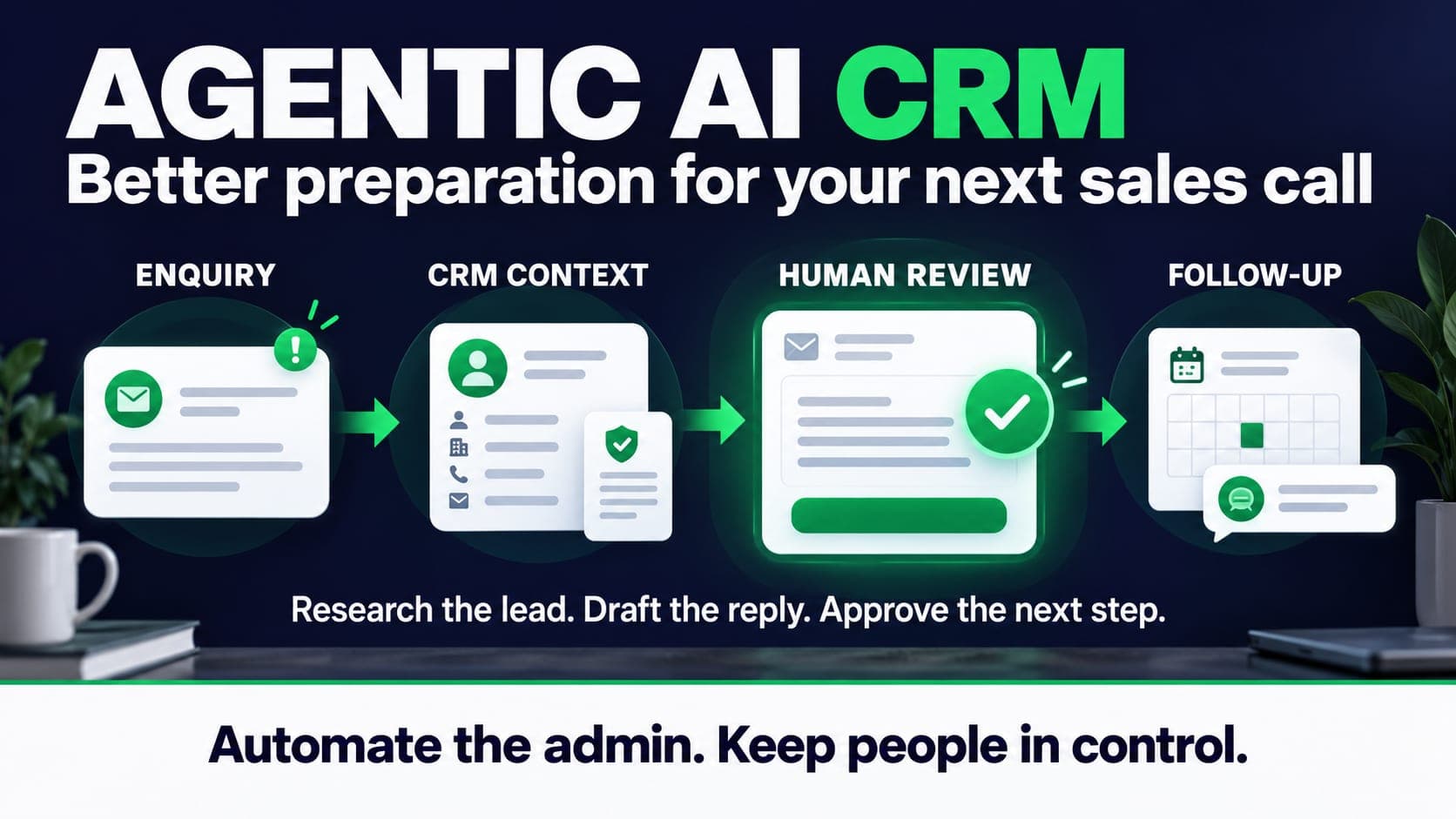
An enquiry arrives while the sales lead is on a call. The contact already exists in the CRM, but the new message mentions a different project. Someone needs to connect the records, read the earlier conversation and decide what to ask next. That is a useful place to assess an AI sales workflow.
An agentic AI CRM combines customer records with software that can use connected tools to work through a task. Depending on its permissions, it might retrieve a conversation, draft a reply or prepare a record update. The product name alone tells you little about what it can reliably do.
This guide focuses on that operational work. It does not assume cold calling has stopped working, promise a percentage improvement or treat a booked meeting as a sale. The examples below are proposed workflows, not measured Knit Infotech client results. Product documentation was checked on 15 October 2026.
Are AI CRMs replacing cold calling?
They can take over parts of research and follow-up. Whether they should replace a call depends on your offer, the buyer and the quality of the conversation. There is no useful universal conversion rate for every market.
For a service business, an informed call can establish constraints that a form never captured: who approves the work, which system must stay and why the previous project stalled. Automating preparation can leave more time for those questions. Sending more unsolicited messages can leave the team with more noise to sort.
Start by locating the delay. If qualified enquiries already arrive but wait for a reply, improve that handover before buying another prospect list. If you need help choosing a first process, read our broader guide to AI agents for small businesses.
Automation, assistant or agent?
Use the least complicated approach that meets the requirement. A form with a few reliable rules may solve the problem without a language model.
| Approach | Suitable sales task | What needs checking |
|---|---|---|
| Rules-based automation | Assign an enquiry using a selected service and region | Missing fields, duplicate records and routing failures |
| AI assistant | Summarise a call or prepare a draft for a sales rep | Accuracy, omissions and the review effort |
| Agent workflow | Retrieve context, propose a next step and prepare an update using connected tools | Tool permissions, decisions, failures and approval before action |
One agent with a small set of tools may be enough. Multiple agents introduce additional handovers and failure cases; they are an implementation choice rather than a requirement for the word agentic.
CRM vendors now document concrete sales-agent functions. Microsoft describes qualification modes that separate research from research and engagement. Salesforce documents reviewing and approving agent emails. Check the relevant edition, region, channel and configuration before assuming a feature is available in your account.
A useful first workflow: enquiry to reviewed reply
Consider a hypothetical website enquiry: a buyer wants a new website connected to an existing CRM. They name the CRM but give no information about data migration or who will maintain the connection.
- Capture the request. Store the original message, source and contact details. Preserve contact preferences and the time it arrived.
- Find the existing record. Match verified identifiers. Send ambiguous matches to a person instead of silently merging two customers.
- Read approved context. Retrieve the relevant service scope and the buyer's previous correspondence, with access limited to the records this workflow needs.
- Prepare the next question. Draft a short reply asking which data must move between the website and CRM. Leave price and delivery dates for the responsible sales person.
- Review and record. Let that person edit or reject the draft. Log the approved reply and assign a follow-up owner.
The draft might ask: “Which CRM do you use, and should the website create new contacts, update existing records, or both?” That is specific enough to move discovery forward without inventing a solution.
Our AI CRM and WhatsApp agent service covers this kind of connected workflow. Where the main problem is moving information between existing systems, review AI workflow automation as well. The service proposal should describe the actual systems and approval points.
Where retrieval helps, and where it does not
Retrieval-augmented generation, usually shortened to RAG, means finding relevant material and giving it to a model as context for an answer. In a sales workflow that material might include an approved service description or a maintained support document.
Microsoft's RAG documentation describes keyword, semantic, vector and hybrid retrieval. A vector database is one possible component. It also warns that grounding does not prevent every inaccurate answer.
Use the correct source for each question. Read a live deal stage from the CRM. Read current availability from the scheduling system. Apply discount limits in application rules. Do not ask a model to infer a binding price from a collection of old proposals.
Record which source supported a draft and when it was last maintained. If sources disagree, or the answer is missing, ask a person. A confident sentence is a poor substitute for an approved policy.
Use retrieval to support a draft. Confirm prices, permissions and availability with the responsible system or person before making a commitment.
Decide what the agent may do
Write permissions as actions a reviewer can inspect. “Help sales” leaves too much open. “Read assigned enquiries and prepare drafts; do not send or change commercial terms” is testable.
| Action | Suggested starting control | Reason |
|---|---|---|
| Read assigned lead records | Limit access to the required records and fields | Keep unrelated customer information out of the workflow |
| Draft a clarification email | Human approval before sending | A plausible reply can still misunderstand the request |
| Update a pipeline stage | Preview the change and log approval | Incorrect stages distort reporting and follow-up |
| Offer a price, discount or deadline | Named commercial owner approves | These statements create customer expectations |
| Send after an opt-out or a failed identity match | Stop the sequence and flag the record | The workflow needs a clear stopping condition |
Treat incoming messages and retrieved documents as material to assess, rather than instructions that can grant new permissions. Replaying a failed job should not send the same email twice. Give the owner a simple way to pause the workflow and inspect what happened.
Email relevance does not guarantee delivery
Personalised copy cannot make an unwanted message welcome. Review why a contact is being approached and which channel they expect you to use. Establish the applicable contact requirements before enabling outbound sending.
Gmail's sender guidelines cover authentication, sender behaviour, spam reporting and additional bulk-sender requirements. Follow the requirements that apply to your sending setup, monitor bounces and complaints, and honour unsubscribe requests. A small sending volume is not a guarantee of inbox placement.
Keep an approval queue during the pilot. Review replies as well as outgoing drafts: a request to stop, a complaint or a question outside the agreed scope should end the automated sequence and reach its owner. Our email marketing guide covers the wider sending programme.
Measure the work after the draft
Choose the baseline before you turn on the agent. Record the existing process, the lead source, how a qualified opportunity is defined and the period you will compare. Keep the same definition during the pilot.
Track time to a reviewed response, staff minutes per enquiry, corrections, duplicate actions and qualified opportunities. Include setup, subscriptions, usage, review and maintenance in cost. A cost-per-opportunity calculation should divide that total by qualified opportunities, rather than by every calendar booking.
If the draft takes longer to check than to write, investigate the source material and task scope. If meetings rise but suitable opportunities do not, inspect qualification before increasing volume. The full-funnel marketing guide explains why the handover to sales matters as much as the first response.
Discovery and qualification also connect. A buyer who has already read a clear service page should not have to answer the same questions again. Our GEO guide covers that earlier research stage.
Run a pilot your team can judge
Choose one source of enquiries and one responsible reviewer. Agree which records the agent may read, which actions it may prepare and what makes it stop. Test missing fields, stale pricing, duplicate contacts, requests to unsubscribe and a failed connection before live use.
Begin with drafts only. Review a representative set of enquiries, including awkward cases, and keep enough time to observe real follow-up. Expand an action only when the recorded results justify it. For a low-volume business, a simpler form or a reliable reminder may remain the better investment.
If you want help mapping the process, bring a few anonymised enquiries and a description of your current CRM to an AI readiness review. The first deliverable should be a clear workflow and its limits, with a reason to build it.
Define the CRM fields, approved knowledge, customer channel and review steps for one sales workflow. Scope and usage costs are confirmed in the proposal.
Questions
Do I need to replace my CRM to use an AI sales agent?
Often the first step is a workflow connected to the existing CRM. Check its API, permissions, data quality and native automation before considering a replacement. Some tasks only need a rule or a reminder.
Does an agentic CRM need several agents and a vector database?
No. The task determines the design. One agent with limited tools may be enough, and retrieval can use keyword, vector or hybrid search. Extra components add costs and failure cases to maintain.
Can RAG prevent an agent from inventing a price?
Retrieval can supply approved information but cannot guarantee a correct answer. Read current prices from an authoritative source, enforce commercial rules outside the model and require approval for commitments.
Should an AI agent send sales messages without approval?
Start with reviewed drafts. Any later permission to send should follow testing, contact requirements, suppression rules, monitoring and a clear stopping condition. Some conversations should remain with a person.
How much does an AI CRM pilot cost?
It depends on the systems, channel, data preparation, permissions and testing. Include setup, software, usage, human review and ongoing maintenance. Ask for a written scope rather than comparing token costs alone.
Sources
- Microsoft: Dynamics 365 Sales qualification modes
- Salesforce: review, edit and approve agent emails
- Microsoft: retrieval-augmented generation, indexes and limitations
- Google: Gmail email sender guidelines

Sam K (Santosh Kumar) founded Knit Infotech in 2013. Based in Noida, he works on web applications, ecommerce, CRM systems and workflow automation. He helps clients agree the scope and technical decisions behind a build.